
Komplettes Radio-Steuerungs-Interface
Weiter unten findet Ihr die Anpassungsanleitung.
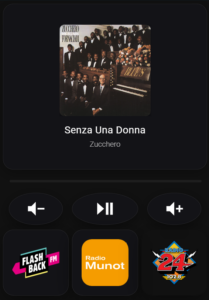
  - type: masonry
    path: radio
    cards:
      - type: custom:button-card
        entity: media_player.kuche_2
        show_name: false
        show_state: false
        show_icon: false
        tap_action:
          action: none
        styles:
          card:
            - height: 400px
            - background: rgba(20, 20, 25, 0.75)
            - backdrop-filter: blur(10px)
            - border: 1px solid rgba(255, 255, 255, 0.08)
            - border-radius: 25px
            - box-shadow: 0 8px 32px rgba(0, 0, 0, 0.3)
            - padding: 30px
          custom_fields:
            logo:
              - position: absolute
              - top: 50px
              - left: 50%
              - transform: translateX(-50%)
              - width: 220px
              - height: 220px
            title:
              - position: absolute
              - bottom: 80px
              - left: 30px
              - right: 30px
              - text-align: center
              - font-size: 24px
              - font-weight: 400
              - color: white
              - letter-spacing: 0.5px
            artist:
              - position: absolute
              - bottom: 50px
              - left: 30px
              - right: 30px
              - text-align: center
              - font-size: 18px
              - font-weight: 300
              - color: rgba(255, 255, 255, 0.7)
        custom_fields:
          logo: |
            [[[
              const albumName = entity.attributes.media_album_name || '';
              const entityPicture = entity.attributes.entity_picture || '';
              const mediaContentId = entity.attributes.media_content_id || '';

              // Prüfe ob es Spotify ist
              if (mediaContentId.includes('spotify:')) {
                return `<img src="${entityPicture}" style="width: 100%; height: 100%; object-fit: cover; border-radius: 12px; filter: drop-shadow(0 4px 12px rgba(0,0,0,0.6));">`;
              }

              // Sonst Radio-Logos
              let logoSrc = '/local/radio-logos/flashbackfm.png';

              if (albumName.includes('Flashback')) {
                logoSrc = '/local/radio-logos/flashbackfm.png';
              } else if (albumName.includes('Munot')) {
                logoSrc = '/local/radio-logos/radiomunot.png';
              } else if (albumName.includes('Radio 24')) {
                logoSrc = '/local/radio-logos/radio24.png';
              }

              return `<img src="${logoSrc}" style="width: 100%; height: 100%; object-fit: contain; filter: drop-shadow(0 4px 12px rgba(0,0,0,0.4));">`;
            ]]]
          title: |
            [[[
              return entity.attributes.media_title || 'Kein Titel';
            ]]]
          artist: |
            [[[
              return entity.attributes.media_artist || '';
            ]]]
      - type: custom:bubble-card
        card_type: separator
        card_layout: normal
      - type: vertical-stack
        cards:
          - square: false
            type: grid
            columns: 3
            cards:
              - show_name: false
                show_icon: true
                type: button
                icon: mdi:volume-minus
                tap_action:
                  action: call-service
                  service: media_player.volume_down
                  target:
                    entity_id: media_player.kuche_2
                card_mod:
                  style: |
                    ha-card {
                      height: 130px;
                      width: 130px;
                      background: rgba(20,20,25,0.75);
                      backdrop-filter: blur(12px);
                      border-radius: 50%;
                      border: 1px solid rgba(255,255,255,0.08);
                      box-shadow: 0 8px 28px rgba(0,0,0,0.35);
                      color: white;
                      margin: auto;
                    }
                    ha-card:active {
                      transform: scale(0.95);
                    }
                color: white
              - show_name: false
                show_icon: true
                type: button
                icon: mdi:play-pause
                tap_action:
                  action: call-service
                  service: media_player.media_play_pause
                  target:
                    entity_id: media_player.kuche_2
                color: white
                card_mod:
                  style: |
                    ha-card {
                      height: 130px;
                      width: 130x;
                      background: rgba(20,20,25,0.75);
                      backdrop-filter: blur(12px);
                      border-radius: 50%;
                      border: 1px solid rgba(255,255,255,0.08);
                      box-shadow: 0 8px 28px rgba(0,0,0,0.35);
                      color: white;
                      margin: auto;
                    }
                    ha-card:active {
                      transform: scale(0.95);
                    }
              - show_name: false
                show_icon: true
                type: button
                icon: mdi:volume-plus
                tap_action:
                  action: call-service
                  service: media_player.volume_up
                  target:
                    entity_id: media_player.kuche_2
                card_mod:
                  style: |
                    ha-card {
                      height: 130px;
                      width: 130px;
                      background: rgba(20,20,25,0.75);
                      backdrop-filter: blur(12px);
                      border-radius: 50%;
                      border: 1px solid rgba(255,255,255,0.08);
                      box-shadow: 0 8px 28px rgba(0,0,0,0.35);
                      color: white;
                      margin: auto;
                    }
                    ha-card:active {
                      transform: scale(0.95);
                    }
                color: white
          - square: true
            type: grid
            columns: 3
            cards:
              - show_name: false
                show_icon: false
                type: button
                tap_action:
                  action: call-service
                  service: media_player.play_media
                  target:
                    entity_id: media_player.kuche_2
                  data:
                    media_content_type: url
                    media_content_id: tunein--kqdEaHjB://radio/s303414
                icon: ''
                card_mod:
                  style: |
                    ha-card {
                      height: 300px;
                      margin-top: 4px;
                      margin-bottom: 4px;
                      background: rgba(20,20,25,0.75);
                      backdrop-filter: blur(16px);
                      border-radius: 26px;
                      border: 1px solid rgba(255,255,255,0.08);
                      box-shadow: 0 14px 45px rgba(0,0,0,0.4);
                      position: relative;
                      overflow: hidden;
                    }
                    ha-card::before {
                      content: "";
                      position: absolute;
                      inset: 14%;
                      background: url('/local/radio-logos/flashbackfm.png') center / contain no-repeat;
                    }
              - type: button
                show_name: false
                show_icon: false
                tap_action:
                  action: call-service
                  service: media_player.play_media
                  target:
                    entity_id: media_player.kuche_2
                  data:
                    media_content_type: url
                    media_content_id: tunein--kqdEaHjB://radio/s15496
                card_mod:
                  style: |
                    ha-card {
                      height: 300px;
                      margin-top: 4px;
                      margin-bottom: 4px;
                      background: rgba(20,20,25,0.75);
                      backdrop-filter: blur(16px);
                      border-radius: 26px;
                      border: 1px solid rgba(255,255,255,0.08);
                      box-shadow: 0 14px 45px rgba(0,0,0,0.4);
                      position: relative;
                      overflow: hidden;
                    }
                    ha-card::before {
                      content: "";
                      position: absolute;
                      inset: 14%;
                      background: url('/local/radio-logos/radiomunot.png') center / contain no-repeat;
                    }
              - type: button
                show_name: false
                show_icon: false
                tap_action:
                  action: call-service
                  service: media_player.play_media
                  target:
                    entity_id: media_player.kuche_2
                  data:
                    media_content_type: url
                    media_content_id: tunein--kqdEaHjB://radio/s2773
                card_mod:
                  style: |
                    ha-card {
                      height: 300px;
                      margin-top: 4px;
                      margin-bottom: 4px;
                      background: none;
                      backdrop-filter: blur(16px);
                      border-radius: 26px;
                      border: 0px solid rgba(255,255,255,0.08);
                      box-shadow: 0 14px 45px rgba(0,0,0,0.4);
                      position: relative;
                      overflow: hidden;
                    }
                    ha-card::before {
                      content: "";
                      position: absolute;
                      inset: 14%;
                      background: url('/local/radio-logos/radio24.png') center / contain no-repeat;
                    }
        grid_options:
          columns: 12
          rows: 5
    title: Radio
1. NOW PLAYING CARD (Große obere Karte)
- type: custom:button-card
  entity: media_player.kuche_2        # ← Dein Media Player
  show_name: false
  show_state: false
  show_icon: false
  tap_action:
    action: none                      # ← Kein Klick-Event
Was macht sie?
Zeigt das aktuell laufende Lied/Radio mit:
- Großes Logo (220x220px)
- Titel unten
- Künstler darunter
Design
styles:
  card:
    - height: 400px                   # Karten-Höhe
    - background: rgba(20, 20, 25, 0.75)  # Dunkler Hintergrund
    - backdrop-filter: blur(10px)     # Blur-Effekt
    - border: 1px solid rgba(255, 255, 255, 0.08)  # Dezenter Rahmen
    - border-radius: 25px             # Runde Ecken
    - box-shadow: 0 8px 32px rgba(0, 0, 0, 0.3)  # Schatten
    - padding: 30px                   # Innenabstand
Hintergrund:
rgba(20, 20, 25, 0.75)= Fast schwarz mit 75% Deckkraftblur(10px)= Weichzeichner-Effekt hinter der Karte
Logo-Position
custom_fields:
  logo:
    - position: absolute
    - top: 50px                       # 50px von oben
    - left: 50%                       # Horizontal zentriert
    - transform: translateX(-50%)     # Zentrierungs-Korrektur
    - width: 220px                    # Logo-Breite
    - height: 220px                   # Logo-Höhe
Logo-Logik (JavaScript)
const albumName = entity.attributes.media_album_name || '';
const entityPicture = entity.attributes.entity_picture || '';
const mediaContentId = entity.attributes.media_content_id || '';

// Spotify-Check
if (mediaContentId.includes('spotify:')) {
  // Zeige Spotify-Album-Cover
  return `<img src="${entityPicture}" style="...">`;
}

// Radio-Logo-Auswahl
let logoSrc = '/local/radio-logos/flashbackfm.png';  // Standard

if (albumName.includes('Flashback')) {
  logoSrc = '/local/radio-logos/flashbackfm.png';
} else if (albumName.includes('Munot')) {
  logoSrc = '/local/radio-logos/radiomunot.png';
} else if (albumName.includes('Radio 24')) {
  logoSrc = '/local/radio-logos/radio24.png';
}

return `<img src="${logoSrc}" style="...">`;
Logik:
- Prüft ob Spotify läuft → Zeigt Album-Cover
- Sonst: Prüft Radio-Sender-Name im Album-Name
- Wählt passendes Logo aus
Titel und Künstler
title:
  - bottom: 80px                      # 80px von unten
  - font-size: 24px                   # Größe
  - color: white                      # Farbe

artist:
  - bottom: 50px                      # 50px von unten
  - font-size: 18px
  - color: rgba(255, 255, 255, 0.7)  # Halbtransparent
title: |
  return entity.attributes.media_title || 'Kein Titel';

artist: |
  return entity.attributes.media_artist || '';
Holt Informationen aus dem Media Player:
media_title= Song-/Sendungs-Namemedia_artist= Künstler/Interpret
2. SEPARATOR (Trennlinie)
- type: custom:bubble-card
  card_type: separator
  card_layout: normal
Was macht sie?
- Visuelle Trennung zwischen Player und Controls
- Dünne horizontale Linie
3. CONTROL BUTTONS (Runde Steuerungs-Buttons)
- type: vertical-stack
  cards:
    - square: false
      type: grid
      columns: 3                      # 3 Buttons nebeneinander
Button-Struktur (alle 3 gleich)
- show_name: false
  show_icon: true
  type: button
  icon: mdi:volume-minus              # Icon
  tap_action:
    action: call-service              # Service aufrufen
    service: media_player.volume_down # Lautstärke runter
    target:
      entity_id: media_player.kuche_2
Die 3 Buttons:
| Button | Icon | Service | Funktion |
|---|---|---|---|
| Links | mdi:volume-minus | media_player.volume_down | Leiser |
| Mitte | mdi:play-pause | media_player.media_play_pause | Play/Pause |
| Rechts | mdi:volume-plus | media_player.volume_up | Lauter |
Button-Design
card_mod:
  style: |
    ha-card {
      height: 130px;
      width: 130px;                   # Rund: 130x130px
      background: rgba(20,20,25,0.75);
      backdrop-filter: blur(12px);
      border-radius: 50%;             # ← 50% = Kreis
      border: 1px solid rgba(255,255,255,0.08);
      box-shadow: 0 8px 28px rgba(0,0,0,0.35);
      color: white;
      margin: auto;                   # Zentriert
    }
    ha-card:active {
      transform: scale(0.95);         # ← Klick-Animation
    }
Design-Merkmale:
border-radius: 50%macht sie rundtransform: scale(0.95)beim Klick = Drück-Effektmargin: auto= automatisch zentriert
4. SENDER-BUTTONS (Große Radio-Sender-Karten)
- square: true
  type: grid
  columns: 3                          # 3 Sender nebeneinander
Sender-Button-Struktur
- show_name: false
  show_icon: false
  type: button
  tap_action:
    action: call-service
    service: media_player.play_media  # Medien abspielen
    target:
      entity_id: media_player.kuche_2
    data:
      media_content_type: url         # Stream-URL
      media_content_id: tunein--kqdEaHjB://radio/s303414  # ← TuneIn ID
Was passiert beim Klick?
- Ruft
media_player.play_mediaService auf - Sendet Stream-URL an
media_player.kuche_2 - Radio beginnt zu spielen
Stream-IDs der Sender
| Sender | TuneIn ID | Logo |
|---|---|---|
| Flashback FM | s303414 | /local/radio-logos/flashbackfm.png |
| Radio Munot | s15496 | /local/radio-logos/radiomunot.png |
| Radio 24 | s2773 | /local/radio-logos/radio24.png |
Button-Design
card_mod:
  style: |
    ha-card {
      height: 300px;                  # Hohe Buttons
      margin-top: 4px;
      margin-bottom: 4px;
      background: rgba(20,20,25,0.75);
      backdrop-filter: blur(16px);
      border-radius: 26px;
      border: 1px solid rgba(255,255,255,0.08);
      box-shadow: 0 14px 45px rgba(0,0,0,0.4);
      position: relative;
      overflow: hidden;               # Logo bleibt im Button
    }
Logo im Button (via ::before)
ha-card::before {
  content: "";                        # Pseudo-Element
  position: absolute;
  inset: 14%;                         # 14% Abstand von allen Seiten
  background: url('/local/radio-logos/flashbackfm.png') center / contain no-repeat;
}
Wie funktioniert das?
::beforeerstellt ein unsichtbares Element vor dem Card-Inhaltinset: 14%= 14% Abstand oben/unten/links/rechts (Logo ist zentriert)background: url(...)= Logo als Hintergrundcontain= Logo vollständig sichtbar, ohne Verzerrungno-repeat= Logo nur einmal anzeigen
Vorteil dieser Methode:
- Kein
<img>-Tag nötig - Logo ist Teil des Button-Styles
- Sauberer Code
Anpassungen
Media Player ändern
Überall wo media_player.kuche_2 steht:
entity: media_player.DEIN_PLAYER
Neuen Sender hinzufügen
- Neuen Button kopieren:
- type: button
  show_name: false
  show_icon: false
  tap_action:
    action: call-service
    service: media_player.play_media
    target:
      entity_id: media_player.kuche_2
    data:
      media_content_type: url
      media_content_id: tunein--kqdEaHjB://radio/DEINE_ID  # ← Neue ID
  card_mod:
    style: |
      ha-card {
        height: 300px;
        # ... (gleich wie oben)
      }
      ha-card::before {
        background: url('/local/radio-logos/NEUER_SENDER.png') center / contain no-repeat;
      }
- TuneIn ID finden:
- Gehe auf tunein.com
- Suche deinen Sender
- URL anschauen:
tunein.com/radio/SENDERNAME-s12345/ - Die Zahl
12345ist die ID - Komplette ID:
tunein--kqdEaHjB://radio/s12345
- Logo hochladen:
- Logo in
/config/www/radio-logos/speichern - Pfad:
/local/radio-logos/SENDERNAME.png
- Logo in
- Now Playing Card anpassen:
// Im logo-Bereich hinzufügen:
} else if (albumName.includes('DEIN SENDER')) {
  logoSrc = '/local/radio-logos/SENDERNAME.png';
}
Control-Buttons anpassen
Größere Buttons:
ha-card {
  height: 150px;
  width: 150px;
}
Andere Icons:
icon: mdi:skip-previous    # Zurück
icon: mdi:skip-next        # Weiter
icon: mdi:stop             # Stop
Andere Services:
tap_action:
  action: call-service
  service: media_player.media_next_track  # Nächster Track
Sender-Buttons Layout ändern
4 Buttons pro Reihe:
type: grid
columns: 4                    # 4 statt 3
2 Buttons pro Reihe:
columns: 2
Dann passen sich die Breiten automatisch an.
Höhere Buttons:
ha-card {
  height: 350px;              # Statt 300px
}
Now Playing Card anpassen
Kleinere Card:
styles:
  card:
    - height: 350px           # Statt 400px
Kleineres Logo:
logo:
  - width: 180px              # Statt 220px
  - height: 180px
Andere Hintergrundfarbe:
- background: rgba(0, 161, 136, 0.3) # Türkis transparent
Grid-Layout Optionen
Ganz unten im Code:
grid_options:
  columns: 12                 # 12 Spalten-Grid
  rows: 5                     # 5 Zeilen
Was bedeutet das?
- Das Dashboard nutzt ein 12-Spalten-Raster
- Karten können unterschiedlich viele Spalten belegen
- Ermöglicht flexible Layouts
Standard: Karten nutzen die volle Breite (alle 12 Spalten)
Zusammenfassung der Komponenten
| Komponente | Typ | Funktion |
|---|---|---|
| Now Playing | custom:button-card | Zeigt aktuellen Song/Sender |
| Separator | custom:bubble-card | Visuelle Trennung |
| Control Buttons | button in grid | Lautstärke & Play/Pause |
| Sender Buttons | button in grid | Radio-Sender starten |
Wichtige Code-Bereiche
Media Player Entity: Suche media_player.kuche_2 (4x im Code)
Stream-URLs: Suche media_content_id: bei den Sender-Buttons
Logo-Pfade: Suche url('/local/radio-logos/
Logo-Logik: Suche if (albumName.includes(
Button-Größen: Suche height: und width:
Farben: Suche rgba(